Whatsapp System Design
WhatsApp is a globally distributed, real-time messaging platform used by billions of users across hundreds of countries. It supports instant messaging, group chats, multimedia sharing, encrypted storage, and presence awareness, all while operating under strict performance and reliability constraints. This design document walks through the architecture and design considerations for building a WhatsApp-like messaging system without diving into encryption internals (by choice), focusing instead on messaging workflows, data flows, scalability primitives, offline synchronization, fault tolerance, client-server interactions, and non-functional trade-offs.
Functional Requirements
A WhatsApp-like system must support the following features:
1. One-to-One Messaging
- Users should be able to send text messages to one another in real time.
- Messages must appear instantly when both users are online.
- If the recipient device is offline, the message must be queued and delivered later.
2. Group Messaging
- Users can create group chats with multiple participants.
- Sending a message in a group must fan-out to multiple clients.
3. Real-Time Delivery
- Message delivery should feel instantaneous.
4. Offline Message Retrieval
- Messages sent while offline must be queued on the server.
- Once the client reconnects, queued messages are delivered in batch.
- Delivery order must be preserved per conversation.
5. Ordered Delivery
- Delivery order must be preserved per conversation.
6. Media Messaging
- Support sharing images, videos, documents, voice notes.
7. Multi-Device Synchronization
- WhatsApp historically tied accounts to a single mobile device, but modern WhatsApp supports multiple linked clients (e.g., Web + Mobile).
- Messages must sync across devices without duplication or reordering.
Lower Priority (Optional Enhancements)
Though not critical use cases, we can have other low priority functionalities:
- Online / last seen presence
- Sent/Delivered/Seen ticks
Sent= message reached WhatsApp serverDelivered= message reached recipient deviceSeen= read by user on device
- Contact availability/status
These features enhance usability but are not required for a minimal viable messaging system.
Out of Scope for This Discussion
We will explicitly not cover:
- End-to-end encryption handshake protocols
- Voice and video calling
- Message deletion (for me / delete for everyone)
- Message retention policies in detail
- Multi-device cryptographic session sync
- Typing indicators
Non-Functional Requirements
Building a messaging system at WhatsApp scale involves complex non-functional constraints:
1. Low Latency
- Users expect messages to appear nearly instantly (typically < 500 ms end-to-end under normal network conditions).
2. Guaranteed Delivery
- Once the sender receives the
'sent to server'acknowledgment, the system should guarantee delivery eventually, unless:- The user is deleted
- The message expires (e.g., undelivered > 30 days)
WhatsApp’s server temporarily stores undelivered messages for a limited window.
3. Enormous Scale
At global scale, capacity planning looks like:
- If WhatsApp has 2B users
- And each sends 100 messages/day
Then total traffic ≈ 200B messages/day
Peak throughput may exceed millions of messages per second during busy hours.
4. Fault Tolerance
Failures are expected:
- Device failures
- Network partitions
- Regional outages
- Datacenter failures
System must continue operating without global outage.
5. Minimal Message Storage
WhatsApp intentionally does not store delivered messages on its servers.
Implications:
- Server-side state is minimized
- Storage cost is reduced dramatically
- Privacy user expectations are reinforced
6. User-Centric Storage Model
Messages are stored:
- On the device indefinitely (until deleted)
- In cloud backups (optional)
- On server only until delivered or expired
7. Efficient Network Usage
Many WhatsApp users are on:
- Limited data plans
- 2G/3G networks
- Unreliable connections
8. Highly Available Global Infrastructure
Data centers must be:
- Distributed globally
- Geographically redundant
- Load balanced intelligently
Message routing should minimize cross-continent RTTs.
Entities
User
Represents a registered WhatsApp user.
- id — unique user identifier
- mobileNo — phone number used for identification/login
- created_at — account creation timestamp
Client
Represents a device/session linked to a user (e.g., phone, web, desktop).
- userId — reference to User
- clientId — unique identifier for the client device
- added_at — when the device was linked
Chat
Represents a conversation (1:1 or group).
- id — chat identifier
- metadata — optional settings (e.g., group name, icon)
- users[] — participants in the chat
- created_at — chat creation timestamp
Message
Represents a single chat message.
- id — message identifier
- senderUserId — reference to User
- chatId — reference to Chat
- content — text body
- asset_url(s) — optional media attachments
- timestamp — when the message was sent
From the chatId we can find out the recipients (1 for one-to-one chat, and many for group chat). We can send the messages to all the recipients
High Level Design
1. Chat Server:
This is the central coordinator for messaging. It receives messages from users, decides who the recipients are, and stores message records so they can be delivered later if someone is offline. For messages that include photos or videos, it also provides presigned URLs from the blob storage, which are temporary links that allow users to upload or download media directly from the client.
2. Chat Database:
This is where chat metadata, user details, message metadata will be stored.
3. Blob Storage (for Media):
Large files such as images, videos, and documents are not stored inside the chat database. Instead, they are uploaded directly to blob storage, which is designed for large binary files. Because this storage does not allow anyone to directly read or write to it, the chat server gives out presigned URLs from the blob storage to the user client, which are temporary permissioned links for uploading or downloading media.
4. Client Applications:
These are the apps users interact with.
They:
- send text messages through the chat server
- upload and download media using presigned URLs
- display old messages (from client app or from cloud)
- handle temporary offline periods gracefully
Putting it Together:
At a high level:
- Text messages go through the chat server and get stored in the message database.
- Media files go directly to blob storage using presigned URLs, and only a reference to the media is stored with the message. This keeps the system responsive and avoids overloading the messaging infrastructure with large files.
Architectural diagram:
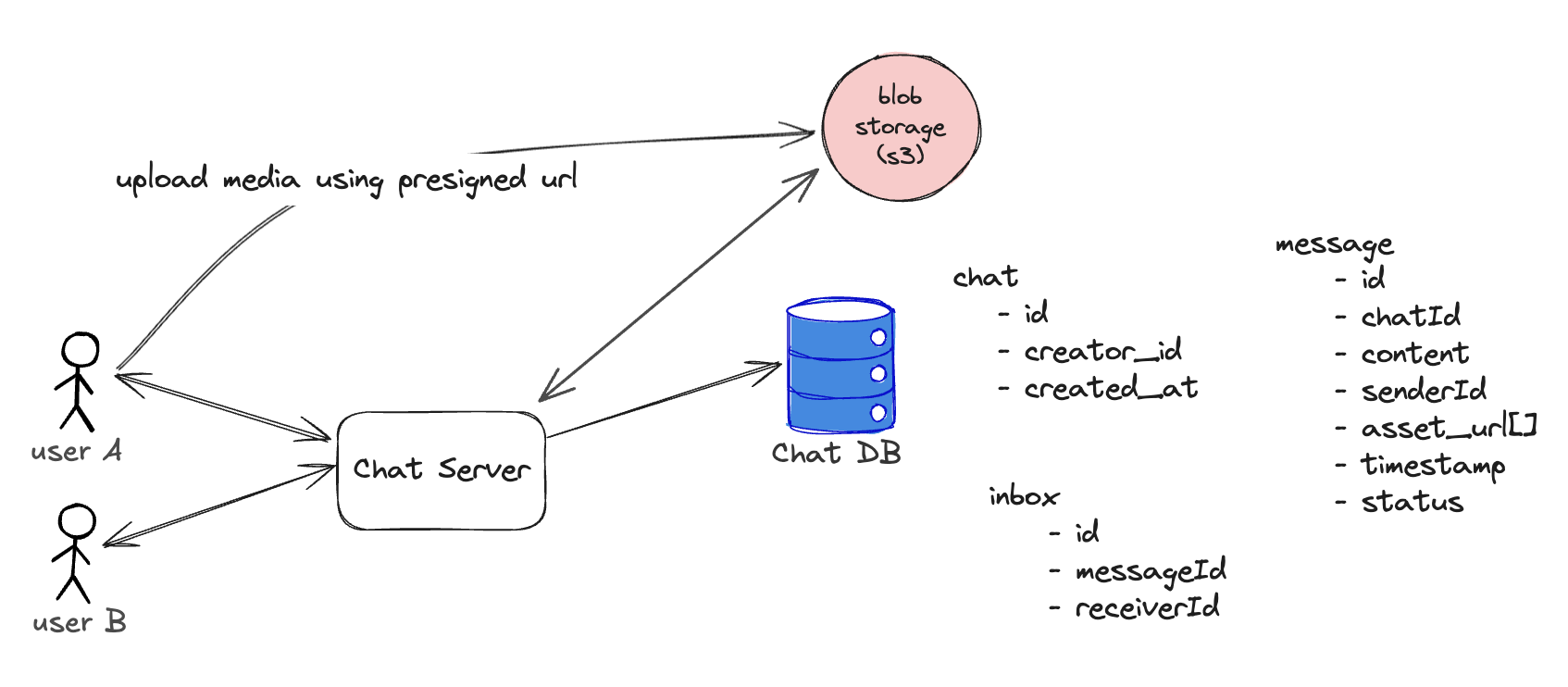
When media delivery scales, adding CDNs and different storage providers introduces complexity. A separate Asset Service acts as a boundary layer so the Chat Service doesn’t need to know where media actually lives or how it’s delivered. This lets you switch storage backends or CDNs without modifying chat logic, because all upload/download handling, permissions, and URL generation stay encapsulated inside the Asset Service.

Flow of Sending a Message with Text + Media (With Components)
When a user sends a message that contains both text and media, the flow looks like this at a high level:
-
User chooses a photo/video and adds a caption text in Client App.
-
Client requests an upload link from Asset Service and Server responds with a temporary upload link for media storage.
-
Client uploads media to blob storage directly avoiding load on Chat or Asset servers. Receives media link when upload completes. Media file can be copied to CDNs next.
-
Client sends message metadata and the uploaded media link to Chat Server.
-
Chat Server stores and distributes the message to the recepients.
-
Recipient requests media when needed from Chat and Asset server. Gets a temporary download link for the media.
-
Recipient downloads the media file directly from blob storage/CDN.
This architecture keeps text delivery fast while letting heavy media traffic bypass the chat servers via direct storage access.
Communication Methods
Modern messaging apps need a way for the client to receive new messages in real time. There are multiple approaches, each with different trade-offs:
1. Polling
How it works:
Client repeatedly asks the server: “Any new messages?”
Pros: simple, works everywhere
Cons: wasteful, delays between polls, high server load
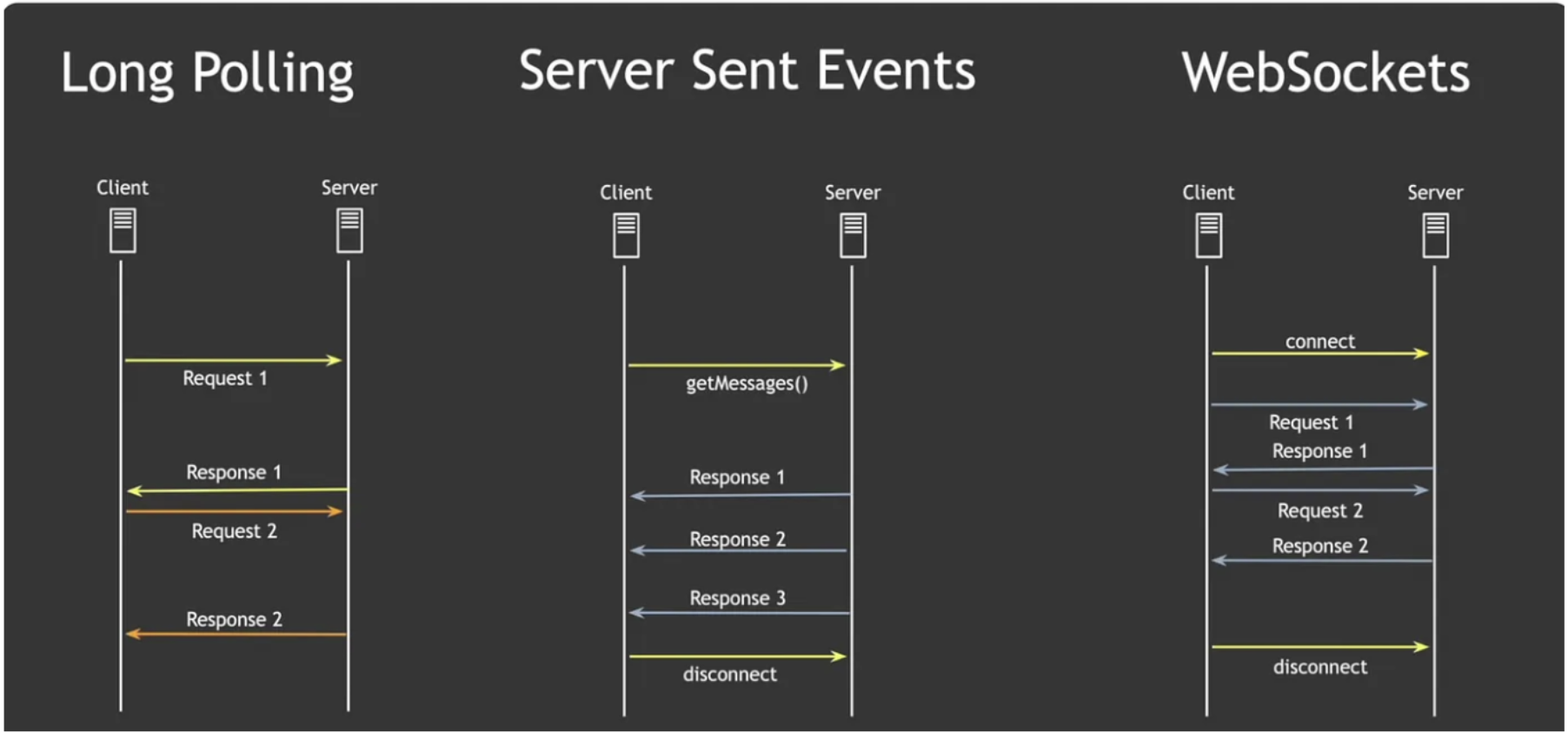
2. Long Polling
How it works:
Client opens a request and the server keeps it open until new data arrives.
Pros: near real-time, lower waste than polling
Cons: still creates many connections under load
3. Server-Sent Events (SSE)
How it works:
This is one-directional connection and server pushes events over time.
Pros: lightweight, one-way push from server, good for real-time feeds
Cons: can’t send data back from client through same channel
4. WebSockets
How it works:
Client and server open a persistent, bidirectional connection. Both sides can send/receive messages anytime.
Stateful, persistent connections to send and push messages instantly.
Pros: full-duplex, lowest latency, ideal for chat
Cons: more complex infra, needs connection management
Which One Do Messaging Apps Use?
Most real-time messaging apps (WhatsApp, Messenger, Slack, Discord) prefer WebSockets because messaging needs:
- bidirectional communication
- low latency
- real-time updates
SSE is common for one-way feeds (e.g., live updates, notifications, dashboards).
Polling & long polling are fallback options for older browsers or poor network conditions.
So in short:
Messaging requires real-time, bidirectional updates → WebSockets are the best fit.
Scale Estimation (High-Level)
To estimate system scale, we consider expected user load, messaging volume, storage requirements, and throughput.
1. User Load
- Monthly Active Users (MAU): 2B
- Daily Active Users (DAU): 1B
- Peak concurrently active users: 100M
2. Message Volume Assuming each user sends 50 messages/day on average: Total messages/day = 1B users × 50 ≈ 50B messages/day
Peak throughput (10% peak factor): Peak = 50B / (24 × 3600 × 0.1) ≈ 57M messages/sec
3. Media Traffic Assuming 20% of messages contain media:
Media messages/day = 50B × 0.20 = 10B
Average media size assumption:
Average = 200 KB per media → 10B × 200 KB ≈ 2 PB/day
4. Storage Requirements
WhatsApp does not store all messages centrally (device-centric storage).
However, temporary undelivered messages must be stored.
Assume undelivered messages buffered for 30 days:
Undelivered buffer ≈ 1% of 50B/day × 30 days ≈ 0.5B × 30 = 15B messages
If metadata per message ≈ 200 bytes:
Metadata storage ≈ 15B × 200 bytes ≈ 3 TB
5. Network Bandwidth Message-only bandwidth (text avg 200 bytes):
50B messages/day × 200 bytes ≈ 10 TB/day
Media bandwidth dominates (≈ 2 PB/day).
6. Device Synchronization Assuming 10% of devices sync on reconnect:
Sync requests/day ≈ 1B × 0.10 = 100M